Monday, October 5, 2009

Acer Aspire 4810 Timeline Laptop Pictures Specs Review

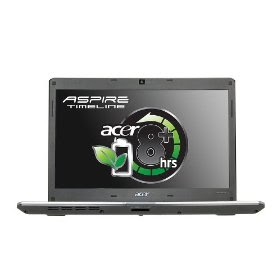
Acer Aspire 4810 Timeline is a laptop with 14.0-Inch display with good review from Amazon on Acer Aspire Timeline 4810's efficiency. Provides up to 8 hours of battery life earn the laptop a title "all-day" laptop. Thus more time for productivity and enables you to go unplugged for long. It is light in weight and compact in size adding to up to its portability.

Acer Aspire 4810 Timeline specifications:

Processor: Intel Pentium SU2700 1.30GHz Processor
Bus speed: 800MHz FSB
Cache: 2MB L2 cache
RAM: 3GB DDR3 SDRAM
Hard Drive: 320GB DDR3 1066 SDRAM Serial ATA
Other drive: SuperMulti Drive
Display: 14.0" WXGA TFT LCD Display (resolution: 1366 x 768)
Display type: HD Acer CineCrystalTM technology (16:9) LED-backlit
Graphic processor: Intel Graphics Media accelerator 4500MHD

Operating System: Microsoft Windows Vista Home Premium
Battery: 6 Cell Lithium-Ion Battery
Size: 13.3 inches (length), 1.1 inches (width), 1.1 inches (height)
Weight: 4.2 pounds
Others: Crystal Eye webcam, Kensington® lock slot, second-generation Dolby® Sound Room audio enhancement, 5-in-1 Card reader, 802.11b/g/Draft-N WLAN, Gigabit LAN

Review of Acer Aspire 4810 Timeline Laptop

We like

1. Silent fan
2. LED backlight produce bright screen which is a good thing when using the laptop outside.
3. The keyboard well spaced and flat keys.
4. Overall design that looks sturdy, smart and neat.
5. Long 8 hours of battery life.
6. Nice hardware specifications.
7. Audio jack connections are available.
8. Video Output HDMI and VGA.
9. Free upgrade to Microsoft Windows 7 operating system.

We dislike

1. Nice sound quality however it is not loud.
2. Firewire port is not available. However you can still do connection to an equipment (such as camcorder) that utilize Firewire port by using an adapter.

Conclusion: Acer Aspire 4810 Timeline is a great laptop for productivity and entertainment. Key feature of 8 hours battery life and good quality of display makes it a good choice for users. You can read more reviews from users at Amazon.


Pictures of the laptop Aspire Timeline 4810:

right side of the Acer Aspire Timeline
Acer Aspire Timeline 4810 Front side

Labels: , ,

Thursday, June 4, 2009

HP Pavilion DV6-1030US Laptop Specs Picture Review

Sophisticated and elegant HP Pavilion DV6-1030US Laptop is a superb innovations inside with handsome outside of metalized finishes and modern lines. HP MediaSmart enable optional TV Tuner at the touch of a button. There is an HDMI port for you to watch movies on HD TV. 16:9 aspect ratio display allows full screen viewing of HD TV and other HD content. Mesh Imprint finish helps in protecting your computer system.

However manufacturer of all laptop in the world should realize that Windows Vista is not a favorite choice among us and should offer other type of operating system such as Ubuntu Linux or Windows XP. HP Pavilion DV6-1030US has a bus speed of 800Mhz which is not so fast but also not slow. The problem is when you like to do multiple task with the laptop at once (such as playing music while transferring large files to external drive and extended desktop to create dual screen environment) and you do not know to tweak Vista, the laptop will be slow.

However there is a slot in HP Pavilion DV6-1030US Laptop that holds the mini remote control which on the left side of the computer. It is a cool thing and for its price, even it is not the fanciest mobile PC on the market but it is good. Below is specification of HP Pavilion DV6-1030US Laptop:

Processor: 2.0 GHz Intel Core 2 Duo T6400
Operating system: Windows Vista Home Premium (64-bit, SP1)
Display: 16-inch LCD screen
Hard drive: 320 GB 5400 RPM
RAM: 4 GB (up to 8 GB)
Optical drive: Dual-layer Lightscribe DVD±R
Connectivity: Bluetooth and Draft-N Wi-Fi (802.11b/g/n)
Graphics: Intel GMA 4500MHD (up to 1759 MB total)
Weighs: 6.34 pounds


front look of hp pavilion dv6 laptop
overall perspective of pavilion dv6
remote of hp pavilion dv6

Labels: ,

Gateway UC-7807U Silver Laptop Specs Picture

Stylish Gateway UC-7807U 13.3-Inch Silver Laptop is not just a handsome machine but also a high tech mobile PC. Using Intel Core2 Duo 2.0GHz Processor with 3GB RAM memory makes it a worthy laptop for entertainment and productivity. Powered by 6-Cell Lithium Ion Battery offers hours of unplug usage. Double-layer SuperMulti drive lets you burn your media files like photos and share with your friends and family. Windows Vista Home Premium is the operating system which is not really people-favorite and you may want to consider to upgrade it to Windows 7 or downgrade it with good old Windows XP. Below is the full specification of Gateway UC-7807U Silver Laptop:

Processor: Intel Core 2 Duo T6400 2.0GHz Processor
Cache: 2MB L2
FSB: 800MHz
Platform: Microsoft Windows Vista Home Premium (32Bit) with SP1
RAM: 3GB DDR2 667 Dual Channel Memory
Hard drive: 250GB 5400RPM Serial ATA
Optical drive: Integrated Super Multi-Drive (8x DVD-Super Multi Double Layer Drive with Seamless Slot Load)
Display: 13.3" WXGA Widescreen Ultra Bright LCD Display
Graphics: Intel Graphics Media Accelerator 4500MHD
Web cam: Integrated 1.3 Megapixel
Ports: 4-in-1 card reader
Audio: Integrated High-Definition
Built-in: speakers, microphone, headphone
Connectivity: Intel WiFi Link 5100 802.11a/b/g/Draft-N; 10/100 Ethernet LAN (RJ-45 port)
Weight: 5.3 lbs
Dimension: 12.6-inch (Width) x 9.4-inch (D) x 1.5-inch (Height)


laptop gateway uc 7807u

Labels: ,

Asus X83VB-X1 Notebook With Webcam and Mic

Asus X83VB-X1 lightweight notebook with gold and black imprint finish is an attractive ultra-portable mobile computer. Powered by Intel Centrino Core Duo T5800 2.0 GHz and hard drive with numerous capacity of 250GB .4GB DDR2 SDRAM ensure smooth system and NVIDIA GeForce 9300M GS graphics together with 14.1-inch widescreen LCD display offer brilliant graphics and text. Full specifications of Asus X83VB-X1 Notebook:

Processor: Intel Centrino Core Duo T5800 2.0 GHz CPU
RAM: 4GB DDR2 SDRAM
Hard drive: 250GB
Operating system: Microsoft Windows Vista Home Premium 64-bit pre-installed w/CoA
Optical drive: DVD±RW DL LightScribe
Sound system: Integrated audio with built-in speakers
Connectivity: 56k modem, integrated Ethernet, 802.11b/g/n Wireless LAN, Bluetooth
Graphics: NVIDIA GeForce 9300M GS
Display: 14.1-inch widescreen LDC


asus notebook x83vb-x1 overall look

Labels: , , ,

Tuesday, June 2, 2009

VTech Learning Laptop

VTech Learning Tote and Go Laptop for Preshcool children is a fantastic education toy .Complete with detachable mouse and colorful keyboard, you can use to program your preschooler for early learning. The cute learning mini laptop comes with 30 activities and LCD screen that displays fun animations so your children can learn music, math, language and games in enjoyable way. With durable and rugged contruction, Vtech laptop is tough. It is also very affordable at only $26.99 and this item ships for free with super saver shipping at Amazon.

vtec children laptop

Labels: , ,

Ericsson R320 Laptop

Ericsson R320 laptop is given away to people who circulating an email. This is actually a hoax and do not believe that by forwarding the email you can get it for free. There is almost nothing free in this world unless air and dirt. It is a false hoax email and believe me you better do anything more productive and worth your time rather than forwarding a hoax mail. The content of the email about free R30 laptop sound like below:

r320 laptop

Subject: Free Lap-Top

Hi, everyone

The Ericsson Company is distributing free computer lap-tops in an attempt to match Nokia that has already done so. Ericsson hopes to increase its popularity this way. For this reason, they are giving away the new WAP Laptops. All you need to qualify is to send this mail to 8 people you know. Within 2 weeks, you will receive Ericcson T18. But if you can send it to 20 people or more, you will receive Ericsson R320.

Make sure to send a copy to: anna.swelung@ericcson.com

Labels: , , ,

Friday, February 13, 2009

Chaper Gaming Laptop Than Alienware?

Acer Extensa EX 5630-4928 is a best option if you are looking or gaming laptop that cheaper than Alienware. You may want to check them at laptop shop or newegg.com. Specifications of Acer Extensa EX 5630-4928:

Operating System: Windows Vista Home Premium
Processor: Intel Pentium dual-core T3400 2.16GHz
CPU L2 Cache: 1MB
RAM: 3GB DDR2
Display: 15.4" WXGA Wide Screen Acer CrystalBrite Technology
Resolution: 1280 x 800 pixels
Storage: 250GB Hard Disk
Optical Drive: DVD Super Multi
Graphics Card: Intel GMA 4500M
Card slot: 1 x Express Card and 1 x Type II PC Card
USB ports: 3
Video Port: 1 x VGA
Audio Ports: Headphones/speaker/line-out/Microphone Line-in
Battery: 6-cell lithium ion
Dimensions: 14.2" x 10.5" x 1.2-1.7"
Weight: 6.4 lbs.
Communications: WLAN 802.11b/g/n Wireless LAN

Labels: , ,

Thursday, February 12, 2009

How To Fix Your Touch pad Cannot Scroll Down

Is your touch pad aka mouse pad cannot scroll down and you do not know what to do? The mouse pad might need new driver installed for it to function properly. You can do it yourself as long as there is Internet access. The guide below apply to any brands including Acer, Dell, Lenovo, Toshiba, Sony Vaio, Macbook, Asus, MSI, Alienware and other brands of laptop:

1. For example, if your laptop's brand is Acer, go to Acer's website.
2. Your mission is to find drivers for your touch pad. When you click on Software and Drivers, you will be asked for your Acer's laptop model number.
3. Enter the number required and you will get a list of drivers that available for your notebook. Find one for your touch pad (for Acer's laptop, usually Synaptics touch pad) and download the drivers.
4. Install the downloaded drivers by double clicking the files.
5. Restart your laptop to see result.

Done! At this rate you should be able to use your laptop's mouse pad aka touch pad again. If this guide help you to fix your laptop's touch pad, please consider to bookmark our site and share with your friends. Thanks!

Labels: , ,

No Audio Sound On Laptop's Speaker - Solution

This is the solution when there is no audio sound on your laptop's speakers. Sometimes this error happens when your hardware is not updated. Try the guide below which already tested and work for someone with no audio sound on her notebook's speakers. First of all, you can try to restart your computer. If it still no sound, follow the guide below:

1. Right click in My Computer and select Properties.
2. Choose Hardware tab and go to Device Manager.
3. Under Sound, Video and Game Controllers right click on each driver and choose update.
4. Restart your laptop and the audio speaker should be normal at this time.

However if your problem still not fixed try to contact your manufacturer.

Labels: , ,

Sunday, February 8, 2009

Dell Promise Pink Laptop

Dell Promise Pink laptop is an epitome of finest mobile computing with quality you can depend on plus it is light in weight. A hot and advanced laptop for a woman, the color looks attractive enough for the eyeballs.

Starting 6 of February 2009, for every sale of Dell Promise laptop, $5 will be donated to Susan G. Komen for the Cure, an organization that support breast cancer research. Dell Promise Pink is available for these Dell laptop models:

Inspiron Mini 9
Inspiron Mini 12
Inspiron 1525
Studio 15
Studio 17
XPS M1330
XPS M1530
Latitude E4200
Studio Hybrid

dell promise pink notebook

Labels: , ,

Saturday, February 7, 2009

How to Connect Laptop to TV?

A user ask how to connect laptop to TV so that he can enjoy all the downloaded movies and videos collection within his laptop's hard drive. You can use a monitor cable (standard) to connect laptop to television if your TV set has a standard DVI or VGA port. For some new laptop you can use HDMI. Now you can watch your favorite film conveniently from your TV screen.

Labels: , ,

How to Clean Laptop Screen?

Use a gentle cleaning solution to clean computer which screen which is widely available at stores (Walmart, electronic stores etc) like Monster LCD Screen Clean Kit and microfiber cloth. Do not use normal cleaning product as it might contain ammonia or alcohol that could cause damage to laptop LCD screen. Use the cleaning solution on clean microfiber and wipe your notebook screen in small circle gently.

Remember not to use paper product and paper towel as it would scratch the laptop screen. The cleaning solution for LCD screen not only clean notebook screen but also plasma TV.

Labels: ,

Friday, February 6, 2009

Toshiba Satellite A305-S6908 Laptop 15.4-Inch

Toshiba Satellite A305-S6908 Laptop is a beautiful laptop which not only nicely designed but offers a fastastic Multimedia experience with its generous 15.4-inch widescreen monitor and 1750MB graphics engine, more than enough for watching high definition movies or playing 3D games. With webcam and microphone ready, Toshiba Satellite A305-S6908 Laptop lets you making long distance Skype VoIP call and video conferences with your friends and family. The laptop is most suitable for students on the go, family usage and small businesses with demanding computing requirements.

Toshiba Satellite A305-S6908 Laptop specifications:

Intel Core 2 Duo 2.0 GHz T6400 Processor
Dimensions: 10.5 x 14.3 x 1.4 inches
Mobile Intel GM45 Express Chipset
Graphics: Mobile Intel Graphics Media Accelerator 4500MHD with 128MB-1759MB Dynamically Allocated Shared Graphics Memory
15.4-inches TruBrite high definition TFT LCD monitor with 1280 x 800 Resolution
Memory of 4GB DDR2 SDRAM
Storage: 250GB
Drive: DVD SuperMulti (+/-R double layer)
Operating System: Microsoft Windows Vista Premium
1.3-megapixel webcam
Integrated microphone
Harman Kardon stereo speakers
Intel Wi Fi Link 5100AGN /802.11a/g/n

Labels: , ,

Tuesday, January 20, 2009

Dell Adamo XPS13 Ultraslim Laptop

Dell Adamo XPS13 is a new luxury laptop lineup for the company. It is an ultraslim laptop that comparable to Apple's MacBook Air notebook. It has ultra-thin design and easy to hold. The Adamo was shown on International CES Las Vegas. Dell not reveal full specs of the laptop yet, but saying it is the best outcome from Dell's performance, craftsmanship and design. The new notebook Dell Adamo XPS13 is expected to be in the store this year 2009. The computer giant is now working on adding the touchscreen feature to complement with Microsoft Windows 7 technology.

Microsoft Windows 7 has multitouch feature that makes a computer becomes more interactive. Thus touch-screen monitor becomes the required device to utilize the new multitouch technology.

Labels: , , , , ,